 Niks Office
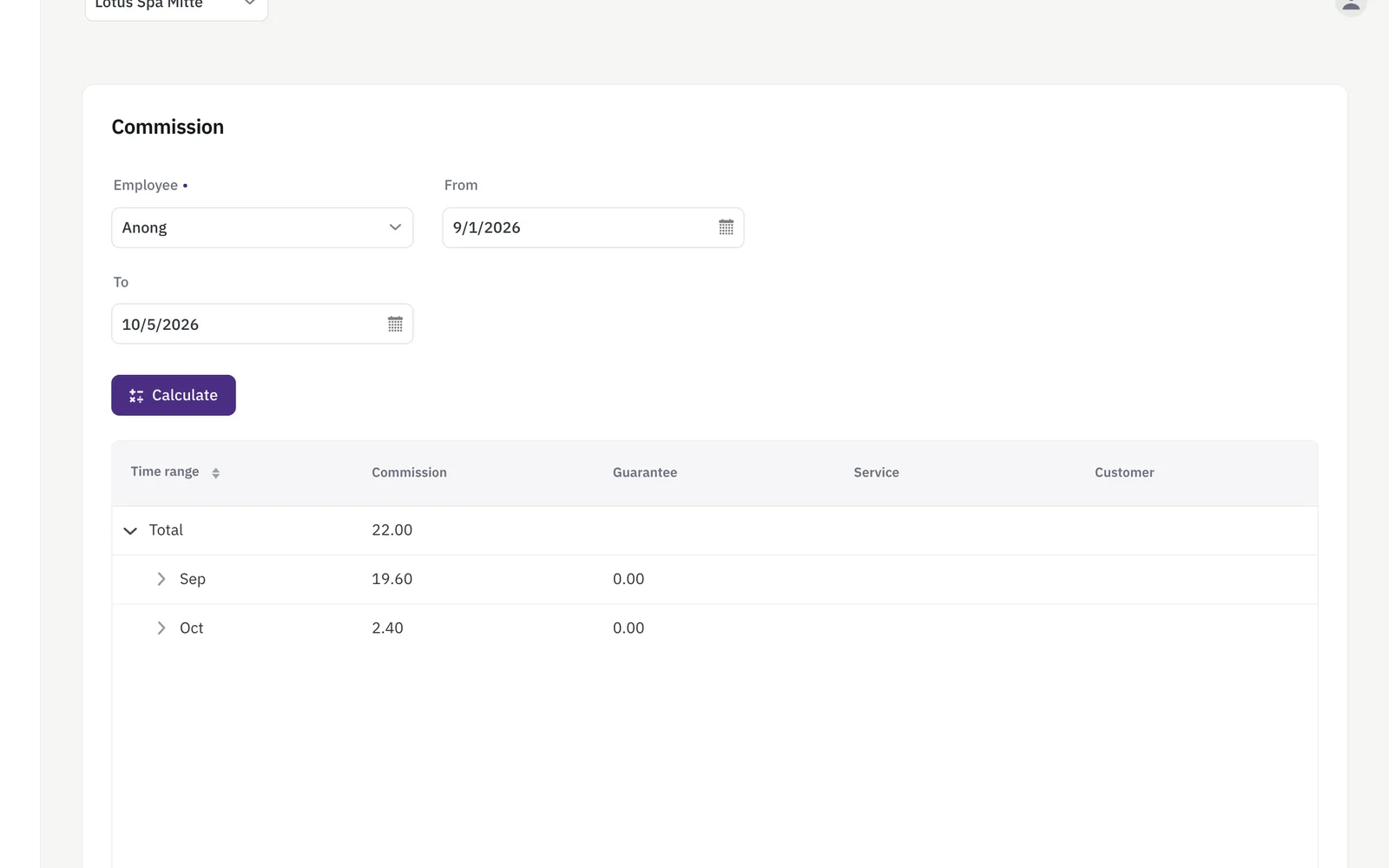
Payroll and staff commission in Niks Office is one screen: pick an employee, pick a date range, press Calculate. The report comes back as a tree — the total, then each month, each week, each day, and under the day every treatment that earned something, with the service and the customer beside it. The commission amount is set once per service in your catalogue; the daily guarantee is set on the employee. Owners use it to settle payouts without a spreadsheet, and to show a stylist exactly which appointments add up to the number.
How it works
- Commission is calculated per employee, over whatever period you choose.
- Guarantee and minimum-payout rules are applied automatically, so no one gets shortchanged by a slow week.
- Business expenses are logged over time, separate from payroll, so the full picture stays in one place.
- A profit report breaks revenue and cost down hierarchically over any date range you pick.
What you get
- Commission calculation per employee & period
- Guarantee / minimum payout handling
- Expenditure tracking
- Hierarchical profit report
- A full statistics screen alongside it — revenue, profit, utilisation and more
Who it's for
- A salon paying a commission per service, where the month-end payout is still typed into a spreadsheet by hand.
- A studio that guarantees a minimum per working day and needs the higher of guarantee and commission for each day.
- An owner who wants to know what is left after staff costs and expenses, not only what came in.
- A business whose staff ask how a payout was reached and deserve an answer line by line.
An example from everyday use
A hair salon pays 8 euros of commission on a cut and 15 on a colour; both amounts sit on the service in the catalogue, and the salon guarantees each stylist 20 euros for a day they turn up. At the end of the month the owner opens the commission screen, picks a stylist and the first to the last of the month, and presses Calculate. The report opens on the total and unfolds: week by week, day by day, down to the single cut recorded that Tuesday afternoon. Days the stylist was not checked in are marked as such and carry no guarantee; on a day where the commission stayed under 20 euros, the guarantee is paid instead.
Commission comes from the treatments your staff record, not from product sales: the amount is set per service in your catalogue, while the guarantee is set per employee. That is what makes any period reproducible at a click.
Frequently asked
How is staff commission calculated in Niks Office?
The commission belongs to the service, not to the person: you set an amount once per service in your catalogue, and it has to be lower than the price. The payroll report then adds up the commission of every treatment that employee recorded in the period you picked, day by day.
Can I show an employee which appointments their payout is made of?
Yes — that is what the tree is for. The report opens on the total, unfolds into months, weeks and days, and under a day lists every treatment that earned something, with its service and its customer beside it. Any period can be recalculated at a click, so the question is answered line by line.
What does the profit report show?
Income from recorded treatments, sold packages and product sales; outgoings from the expenses you logged and what the goods you sold cost you; the total commission your team earned; and the bottom line under all three. You choose the date range — up to three months — and the whole business or a single branch.