For massage, spa & wellness

Calm treatments, calm operations

Several therapists, tight rooms, international guests and series packages — Niks Office was born in a massage practice and keeps all of it in order, so the front desk stays as calm as the treatment room.

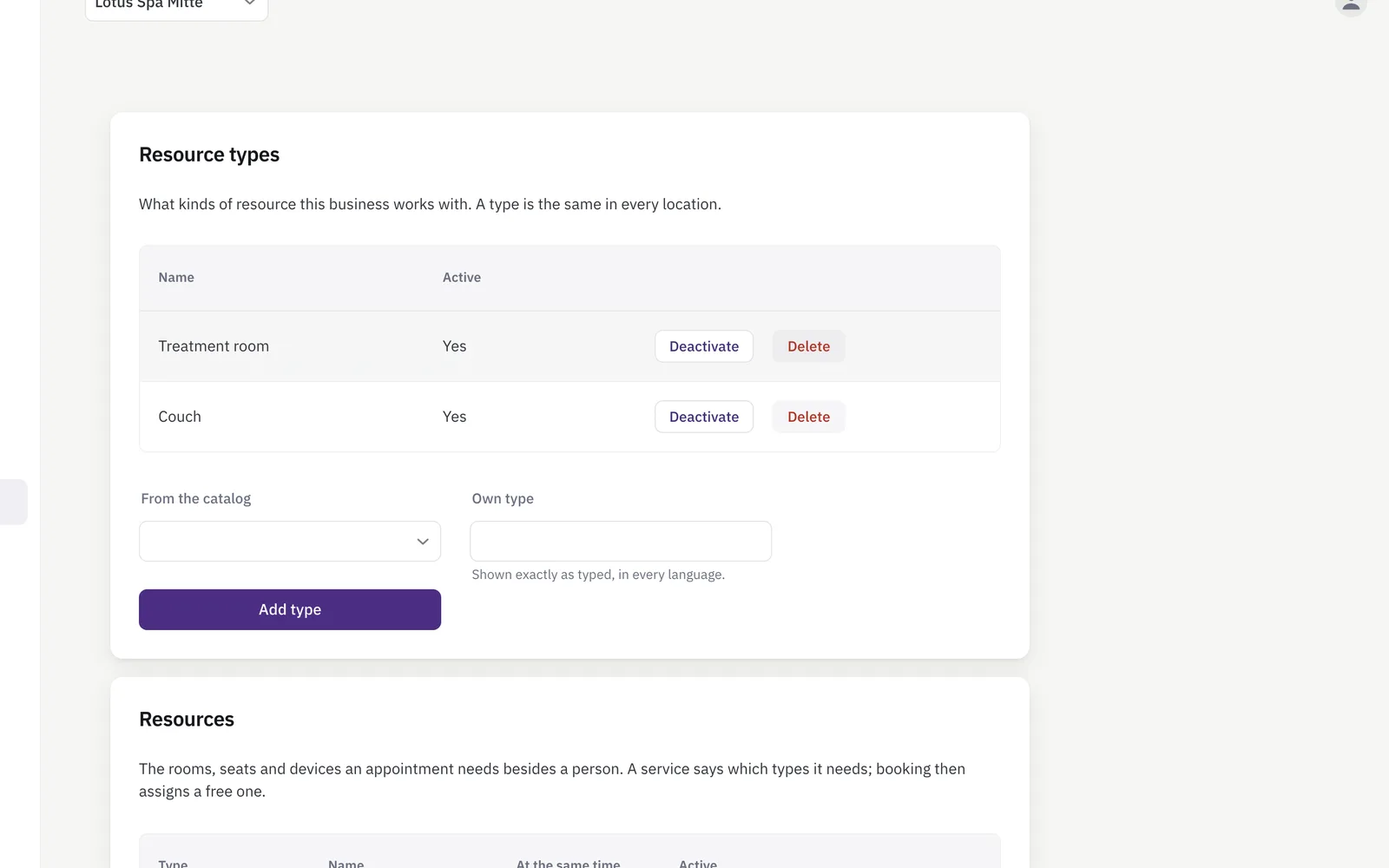
Treatment room and bed list beside a booking form that assigns a room to a massage appointment
Therapist and treatment room booked in one step.

Sounds familiar?

Many therapists, few rooms

Keeping five therapists and three rooms from colliding is a daily puzzle on paper.

Guests who don't speak your language

International walk-ins and regulars book by gesture and hope — confirmations get lost in translation.

Series and vouchers on scraps of paper

Who has how many massages left on their 10-series? Nobody knows for sure.

What Niks Office does for your practice

All therapists side by side

One calendar per therapist, all visible on one screen — bookings, confirmations and changes without double-booking a room or a pair of hands.

More about booking →

Eight languages for your guests

The customer portal and all e-mails run in eight languages — each guest books and reads confirmations in their own. Built on experience with Thai massage practices.

More about languages →

Series packages with a live balance

Sell a series package once; its remaining value counts down automatically with every treatment recorded against it, and the balance is always visible to your team.

More about packages →

Fair pay per therapist

Commission per service and a guarantee per therapist, settled for any period at the push of a button — no end-of-month spreadsheet marathon.

More about payroll →

Rooms and treatment beds, tracked too

Not just who is free, but what is free too: treatment room, bed or sauna are part of the service, and booking only offers times when both are available.

More about resources →

Your page, your link, your bookings

A public page with pictures of your practice, your services and prices — share the link on Instagram or Facebook, and with online booking customers book straight from it. Edit it any time.

More about your business page →

Pressure and favourite oil for every guest

Add “pressure” (gentle, medium, firm) and “favourite oil” as choice fields — a regular gets the usual massage even from a therapist who has never seen them.

More about custom fields →

Set up before you start — and yours to change

Pick “massage therapy” in the setup wizard and Niks Office creates a typical practice for you, once: classic massage, oil massage and hot stone as 60 and 90 minutes each, back-neck-shoulder 30, foot reflexology 30 and 45, four-hands massage 60 for two therapists at once and couples massage 60 as one booking per guest — eleven treatments with duration, clean-up time and price; the customer fields pressure, favourite oil and notes; the staff field languages and a cabin column for working hours; the fields for a recorded service; the resource types cabin, double cabin and chair area, with a yes/no field “Stone heater” on the cabin so a treatment can ask for the cabin it needs; and the roles therapist and masseur. The prices are examples worked out from your currency, so you can book your first appointment the same afternoon and then make all of it your own — rename it, reprice it, switch off what you do not need, add what is missing. Nothing in it is locked.

Up and running in an afternoon

  1. Register for free, confirm your e-mail address and create your practice.
  2. Pick “massage therapy” in the setup wizard — the treatments with duration and price are already there; add your therapists with their calendars.
  3. Share your booking link — with online booking (from Pro) guests book themselves in their language, and confirmations go out automatically.
Pricing

Starter for solo therapists, Pro for practices with a team, Business for advanced reporting — all with a free trial. See pricing →

Questions from practice owners

Can guests book in their own language?

Yes — the booking flow, customer portal and all e-mails work in eight languages; each guest picks their own, independent of yours.

How do massage series work?

You sell a series once; every treatment you record against it debits its remaining value automatically, and your team always sees the value still left.

Can I see all therapists at once?

Yes — every therapist has their own calendar and you see them side by side on one screen.

Does the system handle confirmations?

Yes — with booking notifications switched on, every booking triggers an e-mail confirmation to the guest, in the guest's language.

Does every therapist see a guest’s preferences?

Yes. Custom fields such as pressure or favourite oil sit on the customer record that every member of staff opens before the treatment.

Do I have to set all of this up myself?

No. Choosing “massage therapy” in the setup wizard creates a typical practice once — the eleven treatments with duration and price — four-hands and couples massage among them —, the customer fields such as pressure and favourite oil, the fields for a recorded service, the resource types cabin, double cabin and chair area and the roles — so you can take your first booking straight away. It is a starting point, not a template you are stuck with: rename, reprice, switch off and add whatever you like afterwards. The prices in particular are examples derived from your currency and want your own numbers. You still enter your actual cabins yourself, the double cabin included — how many there are only you know.

Can I offer a four-hands massage?

Yes, from Pro, together with resources. The massage template already brings “Four-hands massage 60” with a staff count of two — set it on any other treatment too — and the calendar offers a time only when two therapists and the cabin are free at once — online and on the staff booking form. The appointment shows both therapists, the revenue counts once at the full price, and the commission base is shared between them unless you switch that off. All the details: Team appointments.

Can we offer a couples massage?

Yes, from Pro, together with resources. The template creates “Couples massage 60” as one booking per guest and the resource type double cabin — your own cabin you enter yourself. Your team creates the pair in the booking form in one step: second guest, their treatment, a second therapist, the double cabin. Both bookings share date, start and cabin, are moved together and cancelled for one guest or both; each guest keeps their own notes and status. The cabin is shared inside the pair but blocked for everyone else. Guests cannot book a couples appointment online yet — they call, and you create it. All the details: Couples appointments.

Typical days in the spa

Day spa · 5 therapists · 3 rooms

Rooms and therapists stop colliding

Five therapists and three treatment rooms were a daily pencil puzzle. A 60-minute Thai massage now only finds a slot when the therapist and a free room are both open, so the guest never hears that the room is taken after all.

Wellness studio · international guests

Every guest books in their own language

Walk-ins and regulars from abroad booked by gesture and hoped the confirmation made sense. The public booking page and the confirmation e-mail now speak eight languages, each guest in the one they chose, while the team keeps working in its own.

Massage studio · 10-treatment series

The series keeps its own balance

Who still has three massages left on their series? That used to be a question for a notebook. The package is assigned once, its remaining value drops with each treatment recorded against it, and the team sees what is left while the treatment is being saved.

Ready for calmer days at the front desk?