For hair salons & barbershops

Your salon, running like clockwork

Less phone, fewer no-shows, commission settled at the push of a button. Niks Office runs bookings, team and numbers for hair salons and barbershops — so you can keep cutting while the diary fills itself.

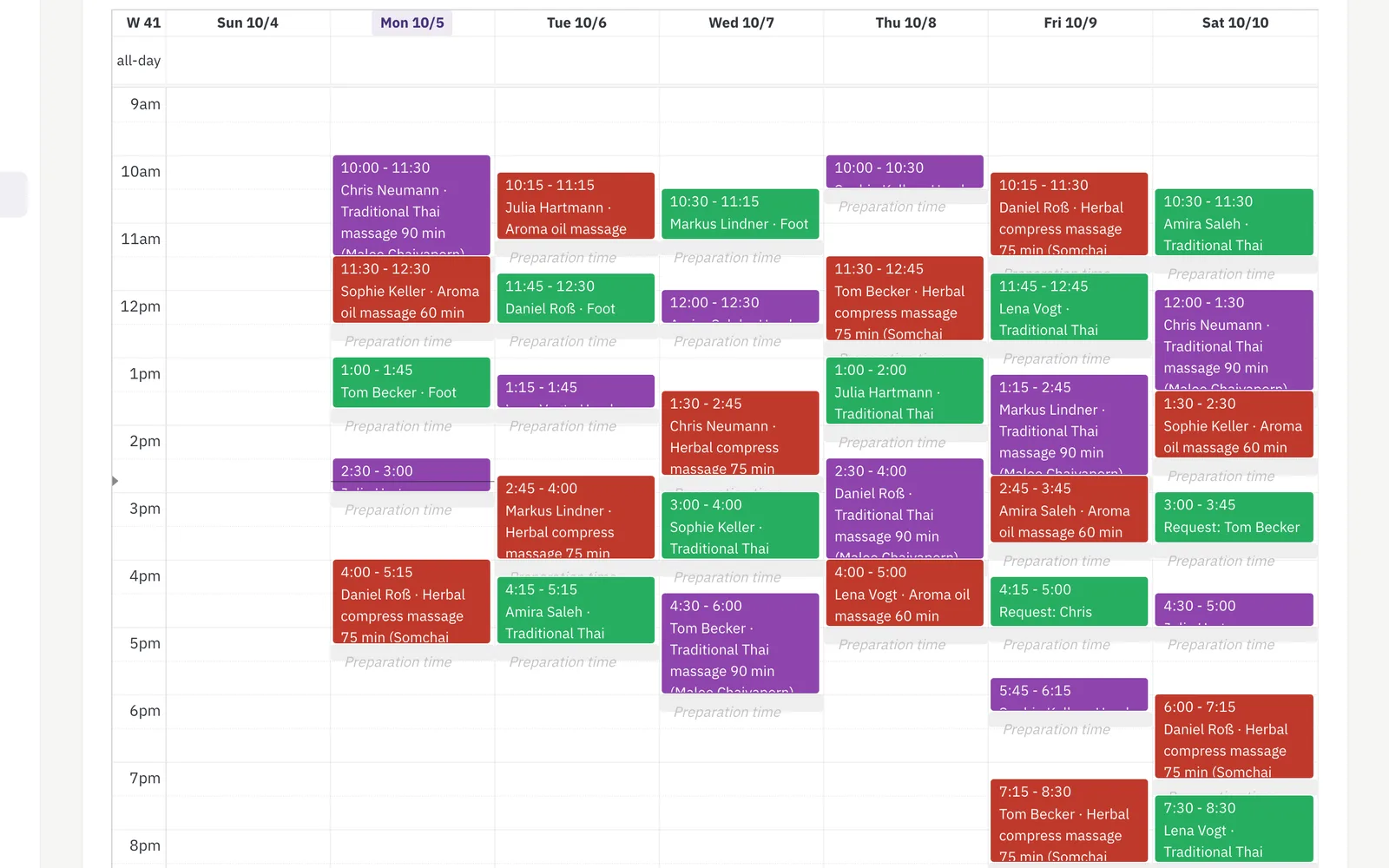
Salon booking calendar in week view with each stylist's appointments colour-coded across the week
Every chair's week at a glance in the salon calendar.

Sounds familiar?

The phone rings mid-cut

Every call interrupts a customer in the chair — and after closing, bookings pile up unanswered.

No-shows cost real money

An empty chair at 3 pm is revenue you never get back.

Commission maths in a spreadsheet

Settling each stylist's cut of services and product sales by hand eats your Sunday evening.

What Niks Office does for your salon

Online booking, chair by chair

With online booking from Pro, customers pick their stylist and a free slot themselves — switch approval on and each request waits for your yes. With booking notifications on, every booking gets an e-mail confirmation, which keeps no-shows down. Ask for hair length once and the same cut carries its own duration and price per answer, so a long-hair appointment never gets a short-hair slot. A junior can carry a price factor — 80 %, say — so every service booked with her costs less than with the owner, maintained as one number per employee.

More about booking →

The half-hour while the colour develops

Applying colour binds a stylist for ten to fifteen minutes; then the colour develops for thirty to sixty, and she is not needed. Give the service a gap of that length and the calendar counts her as free for exactly those minutes, while the chair and the colour basin stay booked — your customer is still sitting in them. The next guest can be offered that time; whether anybody takes it is your decision, not the software's.

More about booking →

Commission settled automatically

Set the commission per service and a guarantee per stylist; the payroll report does the maths for any period, straight from the treatments recorded.

More about payroll →

Shampoo & styling: sales recorded

Keep stock of your retail products and record each sale on the customer — with a low-stock warning in the app before the shelf runs empty.

More about inventory →

Know which chair earns what

Revenue, treatments and average sale per employee on Business, plus utilisation and cancellation rate for the salon as a whole — see at a glance where your money is made.

More about statistics →

Chairs and wash stations, accounted for

Four chairs, two wash stations: booking knows which service needs which spot, and never hands out a slot when the wash station is already taken.

More about resources →

Your page, your link, your bookings

A public page with pictures of your stylists' work, your services and prices — share the link on Instagram or Facebook, and with online booking customers book straight from it. Edit it any time.

More about your business page →

The colour formula, where the next colour is recorded

Give the recorded service a field of your own, “colour formula”, and the formula stays with that visit: in the customer's history, with the date and the stylist, instead of in one colleague's notebook. When the next colour is recorded for the same customer, the last formula is already filled in — as last time — and you overwrite it when the mix changes. Favourite stylist and first visit stay fields on the customer record.

More about the CRM →

Set up before you start — and yours to change

Pick “hair salon” in the setup wizard and Niks Office creates a typical salon for you, once: wash, cut & blow-dry, full colour and highlights each with their own duration and price for short, medium and long hair, perm for short and long, plus men's cut, children's cut, wash & blow-dry, root colour, balayage and toner — ten services with duration, time after and price, six of them with the processing time as a gap in which the stylist counts as free for the calendar; the customer fields hair length, asked online and choosing the fitting variant, and allergy test on; the fields colour formula, processing time (minutes) and result on the recorded service; the resource types chair and wash station; and the role hairstylist. Balayage is created but not bookable online until you switch it on — the consultation beforehand stays with you. The prices are examples worked out from your currency, so you can book your first appointment the same afternoon and then make all of it your own — rename it, reprice it, switch off what you do not need, add what is missing. Nothing in it is locked.

Up and running in an afternoon

  1. Register for free, confirm your e-mail address and create your salon.
  2. Pick “hair salon” in the setup wizard — the services with duration, processing time and price are already there; add your team with their calendars.
  3. Share your booking link — with online booking (from Pro) customers book themselves, and confirmations go out automatically.
Pricing

Starter for the solo chair, Pro for the team, Business for numbers people — all with a free trial and no setup fee. See pricing →

Questions from salon owners

Can customers book online themselves?

Yes, with online booking from the Pro plan. Customers choose stylist, service and time slot online; switch approval on and each request waits for your yes, otherwise the slot is booked straight away.

Does each stylist get their own calendar?

Yes — one visual calendar per employee, all visible side by side on one screen. Mother and daughter who want to come together are booked as a pair, from Pro: two bookings at the same time, moved and cancelled together, each with its own notes. All the details: Couples appointments.

Can I book another customer while a colour develops?

Yes, if you set the colour service's gap: how many minutes after the start it opens and how long it runs. The stylist counts as free for that stretch and the calendar can offer it, while the chair stays blocked because your customer is sitting in it. Leave a margin, so a short cut that runs over does not keep the colour on too long — one appointment per gap, never two.

Can a junior stylist cost less than the owner?

Yes. Every employee carries a price factor in percent, 100 by default. Set the junior to 80 and every service booked with her costs 80 % of its price; the owner at 100 stays as she is. One number per employee, for all services — nothing to maintain per service, and the duration does not change.

Can I track commission on product sales too?

Not in the commission. Product sales are recorded on the customer and show up in revenue, but the payroll report calculates commission from the treatments recorded.

Do my customers see the salon in their language?

Yes — the customer portal and all e-mails work in eight languages; each customer picks their own.

Can I store the colour formula with the customer?

Yes. Give the recorded service a text field “colour formula”; every colour then carries its own, visible in the customer's history with the date and the stylist, and when the next service is recorded for that customer the last formula is offered first and can be overwritten.

Do I have to set all of this up myself?

No. Choosing “hair salon” in the setup wizard creates a typical salon once — the ten services with duration and price, four of them per hair length short, medium and long, six with processing time; the customer field hair length that picks the variant; the fields colour formula, processing time and result on the recorded service; the resource types chair and wash station and the role hairstylist — so you can take your first booking straight away. It is a starting point, not a template you are stuck with: rename, reprice, switch off and add whatever you like afterwards. The prices in particular are examples derived from your currency and want your own numbers. You still enter your actual chairs and wash stations yourself, because only you know how many you have.

Typical days in a salon

Hair salon · 3 chairs · walk-ins

The phone stays quiet during the cut

Bookings used to arrive by phone while a colour was developing, and the answering machine filled up after closing. Now the booking link takes requests around the clock, the owner checks them between two customers, and the confirmation e-mail goes out on its own.

Barbershop · 2 barbers · Saturdays

Fewer empty chairs at three in the afternoon

A Saturday no-show used to be noticed only when the chair stayed empty. Every booking now carries an automatic e-mail confirmation with the exact time, and regulars can check the appointment in their own portal — far fewer forgotten slots.

Salon · 4 stylists on commission

Month-end commission in one screen

Settling each stylist's share meant copying services out of the diary into a spreadsheet every month. Now a date range and a name produce the payout, guaranteed minimums already taken into account, and the figures come straight from the treatments recorded.

Ready to fill every chair?