For physiotherapy & private practices

Treatment series under control, front desk relieved

Series over weeks, notes per patient, therapists to keep utilised — Niks Office organises scheduling and records for private physiotherapy and complementary-health practices, so treatment time stays treatment time.

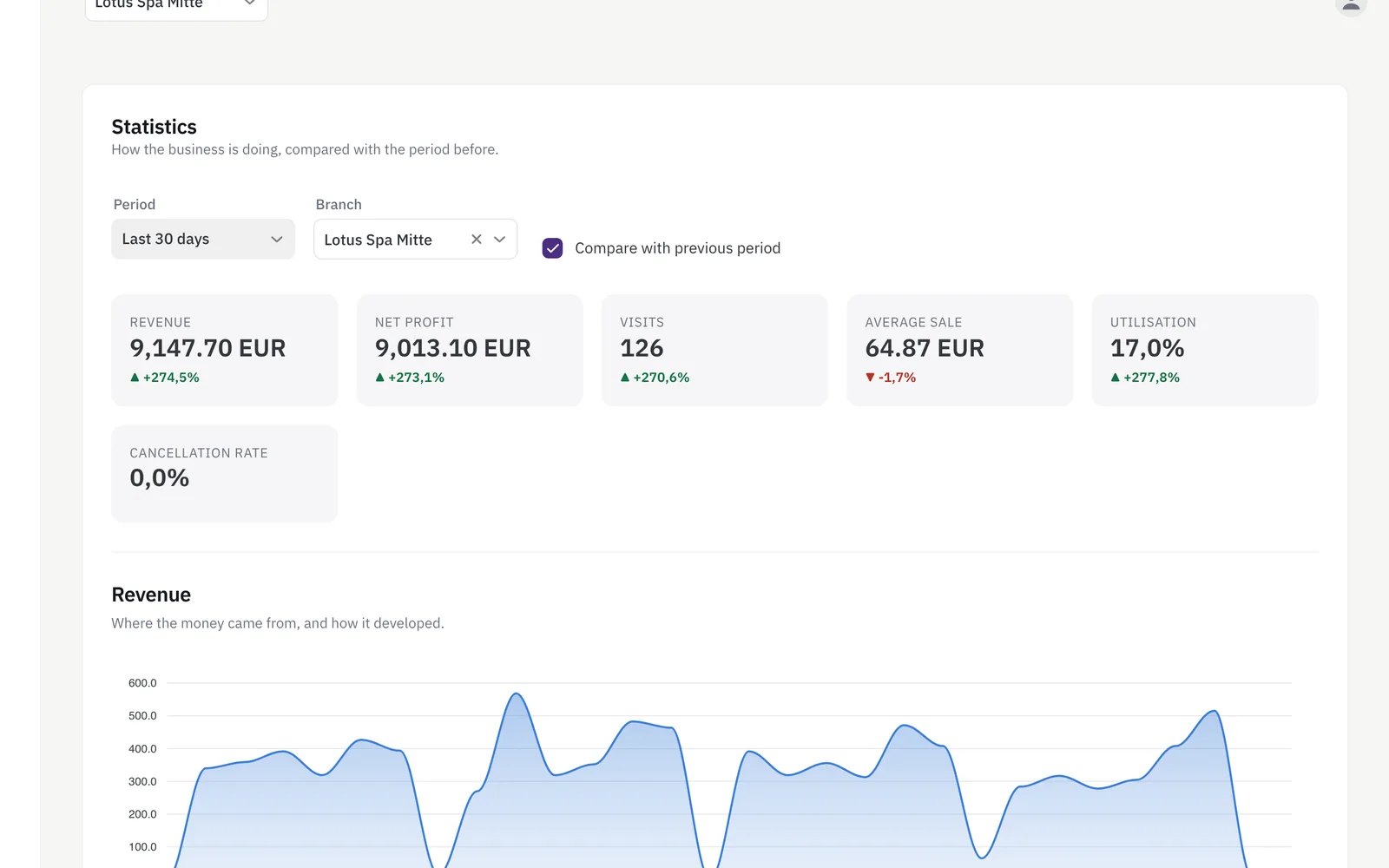
Practice statistics dashboard with revenue, visit numbers, utilisation and a revenue trend chart
How the practice is doing, for any period you pick.

Sounds familiar?

Series lose their thread

Six or ten sessions across weeks — which patient is at which session? Paper lists don't keep up.

The front desk is a phone exchange

Every follow-up appointment is a call, and every call interrupts a treatment.

Missed sessions hurt twice

A no-show costs the slot — and stretches the patient's treatment plan.

What Niks Office does for your practice

Series with a live balance

Sell a series of 6 or 10 sessions once; every treatment you record against it debits its remaining value automatically, and the balance is visible to your team.

More about packages →

History and notes per patient

Treatment history and free-form notes on the patient profile — every colleague sees the course of treatment before the session starts.

More about the CRM →

Online requests, practice keeps control

With online booking from Pro, patients request follow-up appointments online; switch approval on and each request waits for your yes. With booking notifications on, confirmations go out automatically — the front desk stops playing switchboard.

More about booking →

Fango works, the therapist is free

Fango, a heat pack or electrotherapy run for their set minutes on a device, not on your hands. A treatment can carry a gap for exactly that stretch: the calendar counts the therapist as free for those minutes, while the cubicle and the device stay booked for that patient. What goes into the gap is the practice's decision — the calendar only offers the time.

More about booking →

Utilisation and cancellations in view

See the practice's utilisation and cancellation rate at a glance, with revenue per therapist on Business — and plan staffing on numbers instead of gut feeling.

More about statistics →

Your page, your link, your bookings

A public page with pictures of your practice, your services and prices — share the link on Instagram or Facebook, and with online booking customers book straight from it. Edit it any time.

More about your business page →

Prescription valid until, payer, co-payment

Add “prescription valid until” as a mandatory date, “payer” as a choice (statutory, private, self-payer) and “co-payment” as an amount — no treatment without a valid prescription, no surprise at the invoice.

More about custom fields →

Set up before you start — and yours to change

Pick “physiotherapy” in the setup wizard and Niks Office creates a typical private practice for you, once: initial assessment 30, physiotherapy, manual therapy and classic massage each as 20 and 30 minutes, fango / heat pack 20 and electrotherapy 20 — nine treatments with duration, time after and price, the last two with a gap for the minutes in which the pack or the device does the work and the therapist is free; the customer field notes, voluntary and with no health questions; the fields treatment note and actual minutes on the recorded service, visible to the practice only; the resource types treatment room and device, with electrotherapy requiring the device; and the role physiotherapist. It is meant for self-paying and private patients; neither the template nor the software does insurance billing. The prices are examples worked out from your currency, so you can book your first appointment the same afternoon and then make all of it your own — rename it, reprice it, switch off what you do not need, add what is missing. Nothing in it is locked.

Up and running in an afternoon

  1. Register for free, confirm your e-mail address and create your practice.
  2. Pick “physiotherapy” in the setup wizard — the treatments in 20 and 30 minutes with a price are already there; add your therapists with their calendars.
  3. Share your booking link — with online booking (from Pro) patients request appointments online and see their history in the portal.
Pricing

Starter for solo practitioners, Pro for practices with a team, Business for advanced reporting — all with a free trial. Note: Niks Office handles scheduling and organisation for self-pay services; it is not a medical records system and does not bill health insurers. See pricing →

Questions from practice owners

Does Niks Office bill health insurers?

No. Niks Office organises appointments, series and records for self-pay services in private practices. It does not replace a medical practice-management or insurer-billing system.

How do treatment series work?

You sell a series once; every treatment you record against it debits its remaining value automatically, and your team always sees the value still left.

Can patients book online themselves?

Yes, with online booking from the Pro plan. Patients pick a free slot online; switch approval on and your practice confirms or declines each request, otherwise the slot is booked straight away.

Can a therapist see another patient while fango is on?

Yes, if you set the gap on the treatment: how many minutes after the start it opens, and how long it runs. For that stretch the therapist counts as free and the calendar can offer it, while the cubicle and the device stay reserved for the patient lying there. Keep a margin, so the next appointment does not run into the end of the heat pack.

Can I keep notes on each patient?

Yes — free-form notes and the full treatment history live on the patient profile, visible to your team at every appointment.

Can I make the prescription date mandatory?

Yes. A custom date field “prescription valid until” can be marked mandatory; a patient record cannot be saved without it.

Do I have to set all of this up myself?

No. Choosing “physiotherapy” in the setup wizard creates a typical private practice once — the nine treatments with duration and price, fango and electrotherapy with a gap; the customer field notes; the fields treatment note and actual minutes on the recorded service; the resource types treatment room and device and the role physiotherapist — so you can take your first booking straight away. It is a starting point, not a template you are stuck with: rename, reprice, switch off and add whatever you like afterwards. The prices in particular are examples derived from your currency and want your own numbers. You still enter your actual rooms and devices yourself, because only you know how many you have.

Typical days in the practice

Private practice · 2 therapists

The whole course of treatment in one record

Prescribed series spread across weeks lived on clipboard lists that never kept up. Each patient's record now holds the full visit history and the value left on the series, so the therapist sees every visit so far and books the next appointment straight from the record.

Physio practice · 4 therapists

The front desk stops being a phone exchange

Every follow-up appointment used to be a call that interrupted a treatment. Patients now request their slots online and see them in their own portal, the practice checks them between sessions, and the phone is free for the things that really need it.

Therapy practice · prescribed series

Fewer missed sessions in a series

A forgotten session costs the slot and stretches the treatment plan. Every appointment is confirmed by e-mail with the exact time, and patients can check their upcoming visits in the portal themselves — so the series keeps its rhythm.

Ready for an organised appointment book?