 Niks Office
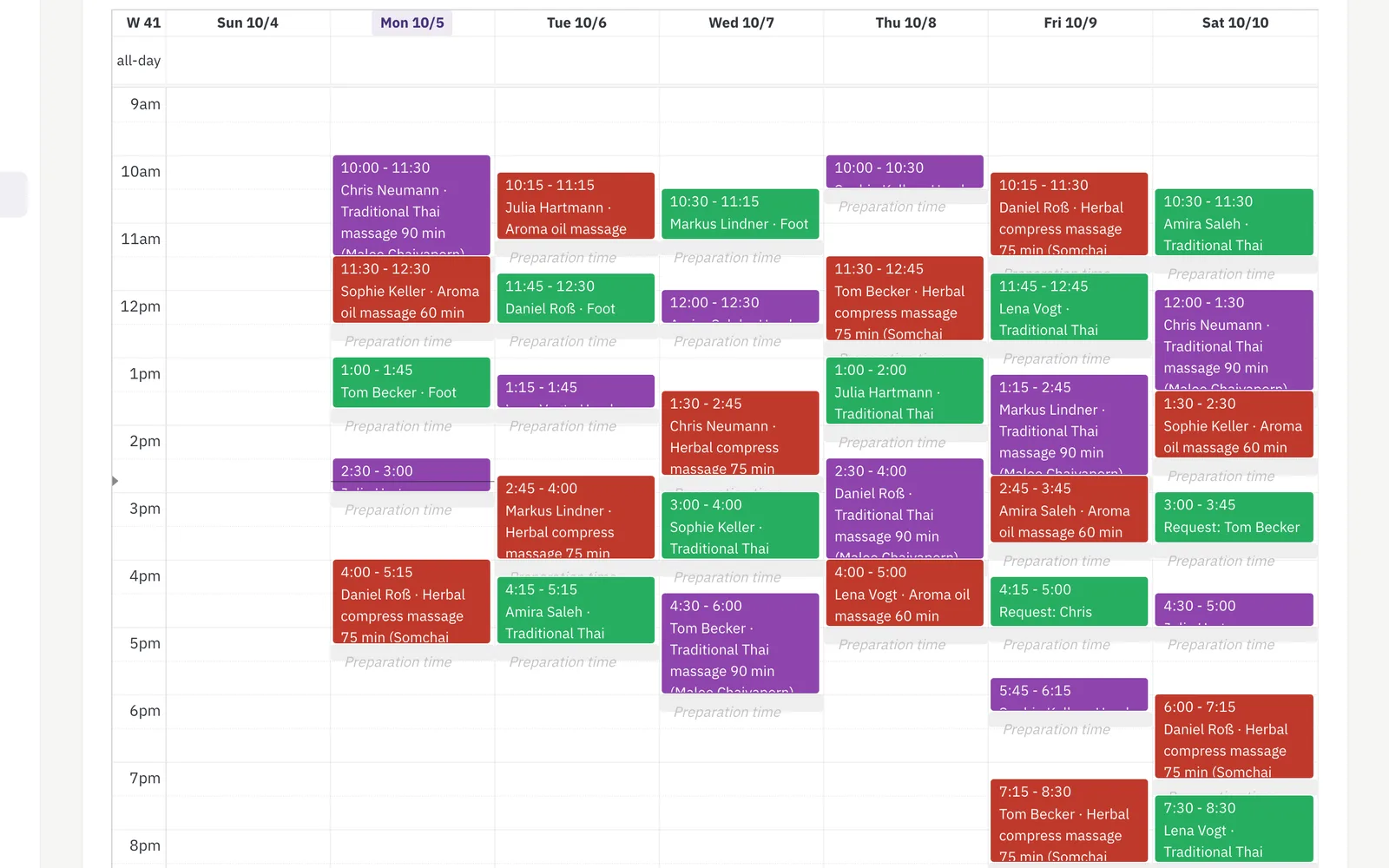
Online booking software for salons is, in Niks Office, the calendar your whole team works from: one visual calendar per employee, switchable between day, week, month and list view. Staff book from that calendar, and from the Pro plan customers book themselves on your public page. Before a slot is offered, the software checks that the employee is free, that the service's duration plus its prep and clean-up time fit, and that every room or chair the service needs is available. Duration and price come from your service catalog — so the phone rings less, and two appointments never land on the same pair of hands.
How it works
- Pick an employee, a service and a time slot on that employee's calendar.
- The service’s duration and price come from your service catalog automatically — nothing to re-enter.
- With booking notifications switched on, the customer gets an e-mail confirmation the moment the booking is saved. No call, no message needed.
- Want it routed differently? Point booking notifications at a specific e-mail address — one for the business, or a separate address per location.
What you get
- One visual calendar per employee
- Service duration & price pulled in automatically
- Duration and price per answer: hair length, dog size, technique
- A price factor per employee: the junior at 80 % makes every service cheaper with her, the owner at 100 % stays as she is
- A gap inside a service: the calendar offers those minutes for the next guest while colour develops or the dog dries
- A service that needs two members of staff at once (from Pro): a four-hands massage or manicure and pedicure in parallel is only offered when both are free
- A couples appointment (from Pro): two guests, two treatments, two staff at the same time in one shared cabin — your team creates it in one step, and it moves and cancels together
- Automatic e-mail confirmation to the customer
- Booking notifications routed to the e-mail address you choose, per location
- Online self-booking for customers (from Pro) — optionally with your approval, for every request or only for first visits
- A filterable list of every booking across the business
Who it's for
- A salon where the phone rings mid-cut: staff drop the appointment into the right employee's calendar in seconds and get back to the chair.
- A studio whose jobs run from a 20-minute trim to a six-hour session: every service carries its own duration plus buffer, so long work blocks exactly the time it needs.
- A business that wants requests outside opening hours: from Pro, visitors pick a location, a service, an employee and a free slot on your public page themselves.
- A team working at two locations: each branch keeps its own calendar, and booking notifications can go to a different e-mail address per location.
An example from everyday use
A hair salon with two stylists opens the week view and sees both calendars side by side. A regular calls for a colour: staff pick the stylist, pick "Colour" from the catalog, and the end time and the price are filled in from the service itself. Booking notifications are switched on, so the confirmation e-mail leaves the moment the booking is saved, and the customer is reminded a day before and again an hour before. That evening somebody books online instead; the request lands in the same calendar, and their confirmation carries a link to view, move or cancel the appointment without an account. A customer who never turns up is marked as a no-show, so the statistics can tell that apart from a cancellation.
Customers can also book online themselves, from the Pro plan: they pick an employee, a service and a free slot. Switch approval on and every request waits for your yes; leave it off and the slot is booked straight away. Your staff can still create bookings directly on the calendar — both land in the same place. Approval does not have to be all or nothing: you can ask for it only when the customer — or, in a grooming salon, the dog — has never been in before.
Frequently asked
Can customers book online themselves with this booking software?
Yes, from the Pro plan. Your public business page gets a booking button, and visitors choose a location, a service, an employee and a free slot. A first-time visitor's selection is only booked once they click the confirmation link in their e-mail. You can require your approval for every request, or let confirmed slots stand immediately.
Does the booking software send appointment reminders?
Yes, by e-mail: one reminder the day before and one an hour before a confirmed appointment, and each of them is a switch you can turn off. Customers receive them in the language they saved for themselves, and every reminder carries the link that lets them move or cancel the appointment without signing in.
Can one booking cover several services at once?
Yes. A single appointment can hold several services in the order they happen — wash, cut, blow-dry — for the same customer and the same employee. Duration and price are added up across the whole list, and the preparation time of the first service and the clean-up time of the last are reserved around the appointment.
Can one service have different durations and prices?
Yes. Pick one choice field the service depends on — hair length, technique, or in a grooming salon the dog's size class — and give every answer its own duration and price. What you leave empty keeps the service's own values. Until the customer has answered, the booking page shows the service as "from" the lowest price. One service follows one such field, never two at once.
Can a service have a gap in the middle where staff are free?
Yes. A service can carry one gap inside its duration — you set how many minutes after the start it opens and how long it lasts — for the stretch where nobody is needed: colour developing, a mask working, the dog in the drying box. For those minutes the employee counts as free, so the calendar can offer the time for the next guest, while the chair, cabin or room stays booked because your customer is still sitting in it. A margin you set keeps a booking shorter than the gap, one gap takes one appointment, and nothing is filled in by itself: the time is offered and a person decides.
Can a junior cost less than the owner for the same service?
Yes. Every employee carries a price factor in percent, 100 by default, and it is one number for all her services. Set a junior stylist to 80 and every service booked with her costs 80 % of its price; the owner at 100 stays exactly as she is. There is no second price list to maintain, and the duration of the service does not change — only the price does.
Can one treatment need two members of staff?
Yes, from the Pro plan, together with resources. Every service carries a number of staff it needs, one by default; a four-hands massage or a manicure and pedicure done at the same time sets two. Online booking and the staff booking form then offer a time only when that many employees are free at once — working hours, blocked times, other appointments and processing gaps count for every one of them. The appointment shows the lead employee and the colleague who joins her. When the service is recorded, the revenue counts once, and the commission base is shared between the participants unless you switch that off. All the details: Team appointments.
Can two guests book together, as a couple?
Yes, from the Pro plan, as a couples appointment your team creates: in the booking form staff switch on “Second guest (couples appointment)”, add the second guest with their own service and notes, a second employee and the shared room or cabin. Both bookings share date, start and room, are moved together, and cancelling asks whether only this guest or both; a guest cancelling in the portal removes only their own booking, the partner keeps the time. Each guest keeps their own status and notes, and one reminder goes to each e-mail address. Both guests need the same duration — different durations are two separate appointments. Guests cannot book a couples appointment online yet; they call, and you create it. All the details: Couples appointments.